Live tariff data · US and Canada, updated 3 hours ago
Know what every tariff change does to your margin.
Your margin, watched continuously. Not just calculated once.
Marginify is landed cost and margin tracking for US and Canadian importers. It works out the landed cost of every product from the official duty rates, warns you when a rate change or tariff notice touches one, and tells you what to charge.
- Free for up to 10 SKUs
- No card required
- Official USITC and CBSA rates
- Works with Shopify, QuickBooks Online and Xero
Try the calculator with made-up numbers: it saves nothing and needs no account. See how your data is protected.
- Item cost
- $4.00
- Freight
- $0.50
- Insurance
- $0.04
- Duty · 16.5%
- $0.66
- Brokerage
- $0.20
- Landed cost
- $5.40
- Selling price
- $19.99
- Margin
- 73.0%
Margin is above your 72% floor. Marginify checks it again whenever a rate or cost changes.
What if…Playing a demo. Tap a scenario to try it.
- official duty rates, including free-trade agreement rates
- 43,515
- US additional-duty headings watched for changes
- 574
- between checks of both tariff schedules
- 6h
Current editions: HTS 2026 Rev. 23 · Customs Tariff T2026-2. Sources: US International Trade Commission (USITC) and Canada Border Services Agency (CBSA).
What Marginify will never do
How your data is protected- Set an extra tariff on a product without your click. A flag says it may apply and links its source.
- Call an estimate a customs ruling. Every result says it is an estimate and lists its assumptions.
- Read your Shopify orders or customers. The connection covers products only.
- Keep the entry summaries you upload. Each file is deleted as soon as it is read.
- Change anything in QuickBooks or Xero but the purchase cost of the items you link.
- Sell your data, show it to other users, or train AI models on it.
How it works
The landed cost you worked out last quarter is probably out of date. Duty is the line most likely to move, and when it does, nobody emails you.
- 1
Add your products
Type them in, import a CSV, connect Shopify, or upload a customs entry summary and add its goods. Each needs a cost, an HS code and a country of origin; freight, insurance and brokerage make it exact.
- 2
Marginify applies the duty
It uses the official US and Canadian tariff schedules, including free-trade rates where your goods qualify. If your broker shows an extra tariff such as Section 301, you add it to the product; Marginify flags those that may apply.
- 3
Every change is recorded
When a cost, a price or a duty rate changes, Marginify saves a new snapshot, so you can see when a margin moved and why.
- 4
You get an alert
If a rate change affects one of your products, a tariff notice names one, or a margin drops under the floor you set, you get an email or a Slack message.
See the real thing
These are screenshots of Marginify with demo data: the same pages you would use on your own products.
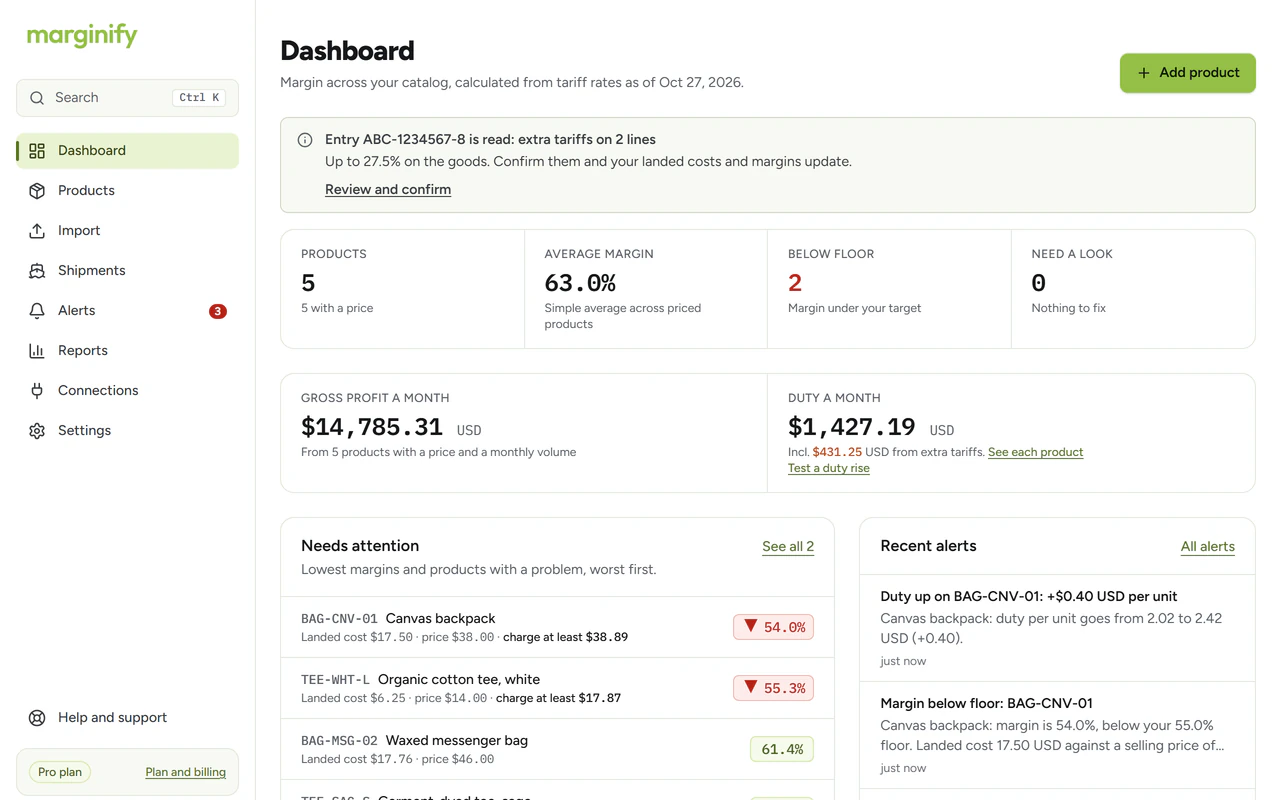
Start with what needs you. The products under their floor, the alerts that landed, and how much of your monthly duty is extra tariffs. Anything waiting on you has one button.
Or watch it work
Short recordings of the app with demo data. They have sound, and captions if you keep it off.
Works with Shopify, QuickBooks Online and Xero
Your catalog comes in from Shopify. The landed cost goes out to your books. Nothing else moves, and each connection reads only what it needs.
Shopify
A product in your store
- Product
- Cotton tee
- Cost per item
- $4.00
- HS code
- 6109.10.00
- Country of origin
- China
- Price
- $19.99
Products come in
with cost, HS code and origin
A price goes back
only one you tick and confirm

Works out the landed cost
- Item cost
- $4.00
- Freight
- $0.50
- Insurance
- $0.04
- Duty, 16.5%
- $0.66
- Brokerage
- $0.20
- Landed cost per unit
- $5.40
Landed cost goes out
to each item you link, when it changes
QuickBooks Online
An item in your books
Cotton tee
- Purchase cost
- $5.40
Xero
An item in your books
Cotton tee
- Purchase cost
- $5.40
An example with made-up figures, the same ones as the receipt at the top of the page.
Shopify
Import on every plan, updated daily from Starter
- Comes in: your products, with the cost per item, HS code and country of origin you keep there. Cost and price stay current; freight, fees, floors and extra tariffs stay yours in Marginify.
- Goes out: the price that restores a margin floor, and only for the products you tick and confirm.
- Never: anything else in your store. The connection reads products only, never orders or customers.
QuickBooks Online and Xero
Pro
- Comes in: your item list, and your company’s name and currency. Marginify proposes links by SKU code, then by name, and you confirm each one.
- Goes out: each linked product’s landed cost per unit, to the item’s purchase cost. Only costs that changed, when you say or every hour, and every send is logged.
- Never: invoices, bills, customers or bank data. Nothing else in your books is touched.
You can disconnect any of them at any time. Shopify, QuickBooks and Xero are trademarks of Shopify Inc., Intuit Inc. and Xero Limited. Marginify is an independent product and is not endorsed by them.
Each alert says what changed and what it costs you
- The rate that changed, with its old and new value.
- What it does to the product: the new landed cost, the new margin, and whether it is now under your floor.
- What it costs you a month, and the price that would restore your floor.
- Only products you sell. A change to a heading you don't import stays quiet.
- Tariff notices that name your products, from the US Federal Register and the Canada Gazette. You confirm any extra rate.
- Future-dated changes are worked out for the day they take effect, so you see them before they land.
- Subject
- Marginify: Duty up on TEE-001: +0.24 USD per unit (below margin floor)
Duty on TEE-001 goes up 0.24 USD a unit on Jan 1, 2027
Cotton tee
| Per unit, USD | Before | After | Change |
|---|---|---|---|
| Duty | 0.66 | 0.90 | +0.24 |
| Landed cost | 5.40 | 5.64 | +0.24 |
| Margin | 73.0% | 71.8% | −1.2 pts |
Your margin floor is 72.0%.
What changedGeneral rate, HTS 6109.10.00: 16.5% → 22.5%
Extra cost a month
about 96.00 USD (at 400 units a month)
To keep your 72.0% floor
charge at least 20.15 USD (you charge 19.99)
Figures are estimates for planning purposes, not a customs-compliance determination.
Try it on one product
Enter an HS code and what you pay. You get the landed cost and margin, with every duty line shown. You don’t need an account, and nothing you enter is saved, so made-up numbers work fine.
Your landed cost appears here
Enter an HS code, the country of origin and the item cost, or fill in an example.
See what extra tariffs really cost you
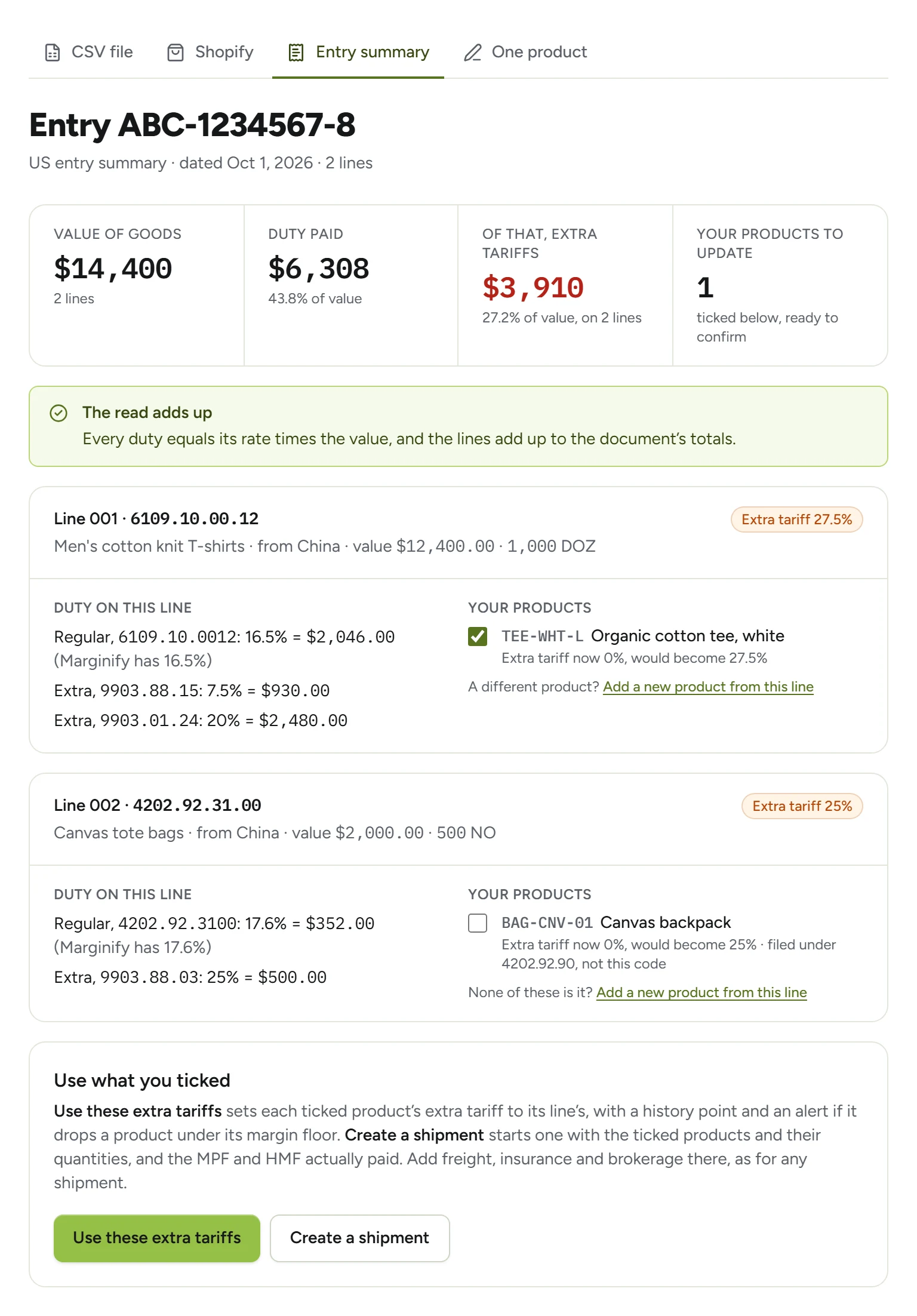
Upload your broker’s CBP 7501 or CBSA CAD. Marginify reads every line, shows which goods paid extra tariffs and how much, and sets them on your products when you tick the lines. Goods you don’t track yet open as a new product, already filled in.
- An AI model reads it, and plain arithmetic checks it: every duty against its rate, every line against the totals, every code against the official schedule.
- Anything that doesn’t add up is marked. Nothing changes until you tick it.
- The file is deleted once it is read. A read that fails isn’t counted.
Reads a month: 1 on Free, 10 on Starter, 30 on Growth, 150 on Pro.
Why not a spreadsheet?
A spreadsheet is a fine place to start. Here is what changes when your rates and costs keep moving.
| When… | A spreadsheet | A one-off duty calculator | Marginify |
|---|---|---|---|
| A duty rate changes | You find out when your broker's bill is higher | Nothing, until you run it again | Emailed, with the new landed cost, the margin, and the price to charge |
| An official notice names your goods | You read the Federal Register yourself | Not part of it | Flagged on your products, with the source. You confirm the rate |
| You want to see how a margin moved | Overwritten each time you update the sheet | One answer, then it is gone | A history point on every cost, price and rate change |
| Your broker sends the entry summary | Retyped line by line | Not used | Read and checked, then the extra tariffs set when you tick the lines |
| Your bookkeeper needs landed costs | Copied across by hand | Not connected | Sent to the item's purchase cost in QuickBooks or Xero, and logged (Pro) |
| Margins slip under your target | A formula you keep up to date | Not tracked | The price that restores your floor, for every product, and a repricing list |
The first two columns describe the kind of tool, not any one product. A spreadsheet is a fine place to start; this is for when the numbers keep moving.
Then it helps you decide, and does the copying
What to charge
For every product, the lowest price that keeps your margin floor at today's landed cost, and a repricing list to download when products slip.
Every plan, including Free
Your margin in money, every month
Add how many you sell a month and see gross profit and duty per month. Alerts say what a rate change costs you, not only the percentage.
Every plan, including Free
A stress test before the next tariff
Add 10 or 25 points of duty to goods from one country, or to everything, and see which products would fall under their floor and the prices that would hold your margin.
Starter and up
Other countries to make it in
The landed cost of the same product from Vietnam, Mexico, India and more, using the official duty and free-trade rates, ranked cheapest first.
Growth and up
Shipments and currencies, worked out
Enter a container's freight and broker's bill once and it is split across the products inside, with the US entry fees. Supplier prices in yuan, euros or yen convert at the Bank of Canada's daily rate.
Shipments from Starter; currencies on every plan
Lists in your inbox
Your product list and repricing list as spreadsheets, emailed every Monday or on the 1st of the month, to you and up to four others, such as your bookkeeper.
Growth and up
Any duty rate, looked up
Every 4-, 6- and 8-digit code in the US and Canadian tariff schedules has its own page: the general rate, the free-trade rates and recent official notices that name it. Extra tariffs are not included; Marginify flags those.
Free, no account
Look up a codeAnnexes read for you
When a tariff proclamation puts its product list in an annex, Marginify reads the annex and checks the codes in it against the products you sell, so those notices flag your products too.
Flags on every plan, alerts from Starter
Start free. Pay for tracking and alerts.
Working out a landed cost is free, and the Free plan doesn’t expire. The paid plans add margin history and alerts.
Is $29 a month worth it? An example with the receipt’s made-up figures: a 25-point extra tariff on a $4.00 item adds $1.00 of duty to each one. At 300 a month, that is $300 a month off your margin. Starter alerts you when an official notice names a product you sell.
Free
Work out the landed cost of your products.
$0forever
- Up to 10 SKUs
- One Shopify store
- One-time landed cost, with freight, duty, brokerage and US entry fees
- Supplier prices in other currencies
- What to charge to keep your margin
- Extra tariffs that may apply
- 20 HS code suggestions a month
- 1 entry summary read a month, to try it
- No card required
Starter
Track margin and get alerted on US imports.
$29per month
- Up to 100 SKUs
- One Shopify store
- 300 HS code suggestions a month
- 10 entry summary reads a month
- Margin history for every SKU
- Email alerts for floors, rate changes and tariff notices
- Shipments split freight and fees for you
- Exchange rates updated daily
- Tariff stress test
- US duty coverage
Growth
Add Canada, sourcing comparison, Slack and supplier reports.
$49per month
- Everything in Starter
- Up to 500 SKUs
- One Shopify store
- 800 HS code suggestions a month
- 30 entry summary reads a month
- Canada duty coverage and surtax orders
- Compare sourcing countries
- Slack alerts
- Margin by supplier
- Product and repricing lists emailed weekly or monthly
Pro
For growing catalogs, with costs sent to your books.
$99per month
- Everything in Growth
- Unlimited SKUs
- Unlimited Shopify stores
- 3,000 HS code suggestions a month
- 150 entry summary reads a month
- Landed costs sent to QuickBooks Online or Xero
- Priority support
Questions importers ask
Is the duty figure a customs ruling?
Where do your tariff rates come from?
Does it include Section 301, Section 232 and reciprocal tariffs?
How accurate is the entry summary reading?
Do I need a Shopify store?
What does Marginify change in QuickBooks or Xero?
Who can see my costs and margins?
What happens to my data if I downgrade or cancel?
Who answers support?
Check one product in under a minute
Run it through the free calculator, or create an account and add your catalog.